Introduction
Growth has a way of exposing the cracks in how B2B companies manage customers. Leads live in spreadsheets, sales and marketing run on separate systems, and customer data ends up scattered across whatever tools each team happened to pick up along the way.
This guide walks through the whole implementation process, start to finish planning, CRM setup, data migration, configuring each Hub, reporting, and training so you end up with a HubSpot portal built to grow with the business, not just get through launch day.
What Is HubSpot CRM Implementation?
A lot of businesses sign up for HubSpot and think that's the job done. It isn't. Creating the account is step one. The real work starts when you shape the platform around how your sales team actually sells, how marketing actually runs campaigns, and what leadership actually needs to see in a report.
“HubSpot implementation is that process of setting the platform up so it fits your business instead of the other way around.”
Most implementations touch a similar set of things CRM configuration, migrating over customer data, building sales pipelines, setting up marketing assets, workflows, connecting whatever other tools you're running, and dashboards leadership can actually use.
Why HubSpot Is the Preferred CRM for B2B Companies

B2B sales isn't simple by nature. A single deal might involve five or six decision-makers, a handful of meetings, a couple of product demos, some back-and-forth on pricing, and weeks, sometimes months of follow-up before anyone signs anything. Try running that process off spreadsheets or a patchwork of disconnected tools, and things slip through the cracks. Opportunities get missed. Customers get a different experience depending on who they talk to.
Here's what actually makes the difference:
Here's a fresh pass with varied header phrasing so they don't all follow the same template:
1. One Place for Everything About a Customer
Contacts, companies, deals, emails, meetings, activity history it's all sitting in HubSpot. Any team can pull up a customer and get the whole picture, not just the slice they happen to own.
2. Sales and Marketing Stop Working Against Each Other
Same CRM, same data. Handoffs are easier to track, campaign results are easier to measure, and qualified leads don't quietly disappear somewhere between marketing and a closed deal.
3. Less Time Spent on Busywork
Lead assignment, follow-up emails, task creation, deal updates a lot of this just runs on its own in HubSpot, which means more time talking to actual customers and less time updating records.
4. It Doesn't Outgrow You
Startup or enterprise, doesn't matter much. Custom properties, pipelines, workflows, and integrations let the platform flex as your processes change, instead of forcing you to work around it.
5. Numbers You Can Actually Trust
Real-time dashboards on pipeline health, marketing performance, sales activity, revenue trends the kind of thing that lets you make a call without waiting around for someone to pull a report by hand.
Also Read : B2B Marketing Operations with HubSpot: A RevOps Framework for Scalable Growth
HubSpot Setup Guide for B2B Companies: Step-by-Step Process
A successful HubSpot implementation doesn't begin with importing contacts or building workflows. It starts with understanding how your business operates and configuring the platform to support those processes.
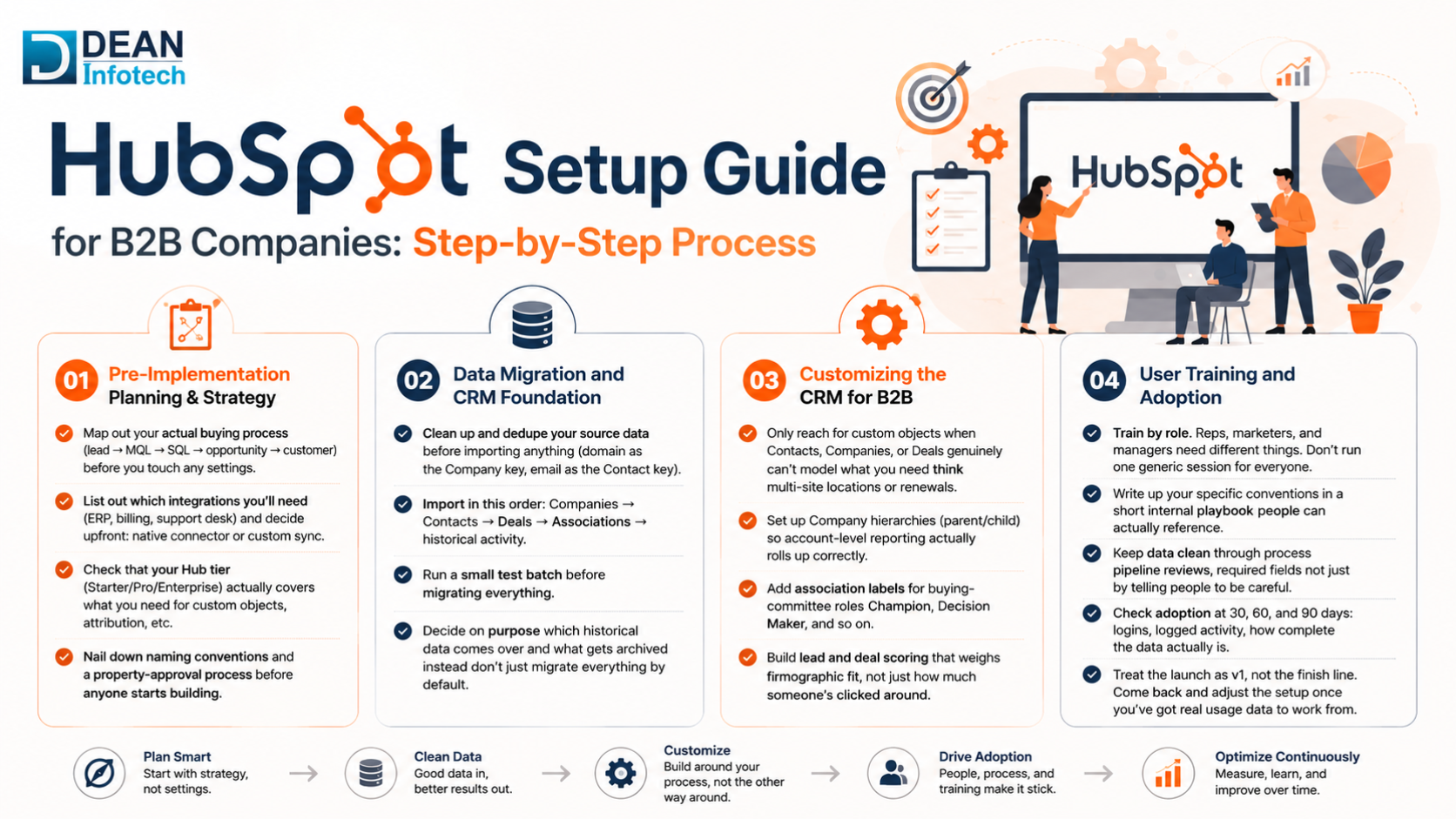
a. Pre-Implementation Planning & Strategy
Map out your actual buying process (lead → MQL → SQL → opportunity → customer) before you touch any settings.
List out which integrations you'll need (ERP, billing, support desk) and decide upfront: native connector or custom sync.
Check that your Hub tier (Starter/Pro/Enterprise) actually covers what you need for custom objects, attribution, etc.
Nail down naming conventions and a property-approval process before anyone starts building.
b. Data Migration and CRM Foundation
Clean up and dedupe your source data before importing anything (domain as the Company key, email as the Contact key).
Import in this order: Companies → Contacts → Deals → Associations → historical activity.
Run a small test batch before migrating everything.
Decide on purpose which historical data comes over and what gets archived instead don't just migrate everything by default.
c. Customizing the CRM for B2B
Only reach for custom objects when Contacts, Companies, or Deals genuinely can't model what you need think multi-site locations or renewals.
Set up Company hierarchies (parent/child) so account-level reporting actually rolls up correctly.
Add association labels for buying-committee roles Champion, Decision Maker, and so on.
Build lead and deal scoring that weighs firmographic fit, not just how much someone's clicked around.
d. User Training and Adoption
Train by role. Reps, marketers, and managers need different things. Don't run one generic session for everyone.
Write up your specific conventions in a short internal playbook people can actually reference.
Keep data clean through process pipeline reviews, required fields not just by telling people to be careful.
Check adoption at 30, 60, and 90 days: logins, logged activity, how complete the data actually is.
Treat the launch as v1, not the finish line. Come back and adjust the setup once you've got real usage data to work from.
Common HubSpot Implementation Mistakes and How to Avoid Them
Small missteps early on tend to snowball into poor adoption, reports nobody trusts, and processes that create more work instead of less. The good news: most of this is avoidable if you know what to watch for.
1. No clear goals going in
Configuring HubSpot without knowing what you're trying to achieve usually ends up in an unfocused setup that doesn't serve anyone well. Set something measurable first faster lead conversion, a shorter sales cycle, whatever matters most before you start building.
2. Bringing in bad data
Duplicate or outdated records don't just sit there quietly they skew reports and mess with automation. Clean things up, remove duplicates, and standardize your property values before anything gets migrated.
3. Customizing more than you need
Too many custom properties, pipelines, or workflows and HubSpot turns into something nobody can keep track of. Start with what you actually need and build out from there as the business grows into it.
4. Skipping training
Even a well-built CRM falls flat if people don't know how to use it. Role-based training, documentation that's actually simple to follow, and support that continues past launch day all help adoption stick.
5. Automating everything right away
Complex workflows built before you understand your own process usually just create confusion. Start with the automations that matter most lead assignment, follow-up reminders and add more once things settle.
6. Leaving other systems disconnected
Keep HubSpot siloed from your ERP, accounting, or support tools, and you end up doing work twice with data that doesn't match. Connect what you can, and you get one reliable source of truth instead of five conflicting ones.
Sidestep these and you end up with a CRM your teams can actually rely on one that saves time instead of creating more of it.
How Dean Infotech Helps with HubSpot Implementation
At Dean Infotech, we don't think launching a CRM is the finish line. The goal is a system that actually makes work easier, cuts down on the manual stuff, and holds up as the business grows, not just a portal that technically works on day one.
We're a HubSpot Gold Solutions Partner, and we've worked with businesses across a range of industries to implement, customize, and fine-tune HubSpot around how they actually sell, market, and support customers. Our team brings both the strategy side and the technical build side together, so the portal ends up shaped around your business not the other way around.
What Sets Dean Infotech Apart?
HubSpot Gold Solutions Partner, with implementations we can point to and back up.
Full end-to-end service discovery, planning, build, launch, and what comes after.
Specialists in both HubSpot and Salesforce, so you're not locked into one path if your CRM needs to integrate or scale differently down the line.
Real experience connecting ERP systems, accounting software, third-party tools, and whatever custom workflows your business runs on.
Training and support that doesn't stop at launch because adoption is where most implementations actually succeed or fail.
Need expert help? You can hire a HubSpot developer to assist with your implementation.
Conclusion
A HubSpot implementation that actually works is more than just setting up a CRM. It's about building something that connects sales, marketing, and customer service instead of leaving each team on their own island and doing it in a way that actually makes the day-to-day easier, not harder.Get the strategy right, keep the data clean, and configure it properly, and HubSpot starts paying for itself pretty quickly.
If you're looking to implement HubSpot from scratch or fix up a portal that's already fallen behind, that's what we do at Dean Infotech. Our team handles the full picture implementation, data migration, CRM customization, workflow automation, integrations, and support that doesn't stop once the platform goes live.
Need expert help with your next project?
Get expert guidance across Salesforce, HubSpot, GoHighLevel (GHL), AI, and web development — tailored to your business.









Comments