As organizations scale, managing customer interactions, lead management, reporting and operational tasks becomes more complex. Conventional workflow automation could help, but today companies are going beyond by offering AI-powered workflows.
HubSpot AI consulting is transforming how companies construct and manage workflows by allowing intelligent decision-making, prediction, and automation throughout the customer lifecycle.
Instead of just sticking to set rules, intelligent workflows powered by AI will be able to: Analyze data, recognize patterns, suggest next steps and adapt to customer behavior on the fly.
This guide discusses how companies utilize the power of HubSpot AI agent workflows in building scalable, efficient and growth-driven processes.
What is a HubSpot AI Agent Workflow?
An AI agent workflow blends AI and automation to take care of tasks, grasp information, and make decisions all on its own with hardly any human input and these systems aren't tied down to simple if-then rules; they can adapt and work with new data. They can also suggest actions for customers at different stages in the company's processes.
For example:
Standard workflow sends a follow-up email after a form submission
AI-driven one can judge how interested a buyer is based on their engagement with certain materials
Uses that insight to decide which leads matter most
Selects the right approach to contact them.
Beyond that, these AI arrangements benefit businesses in other big ways too. Not only do they help firms figure out the types of connections and intentions they should be having with clients, but they also manage lead traffic more efficiently.
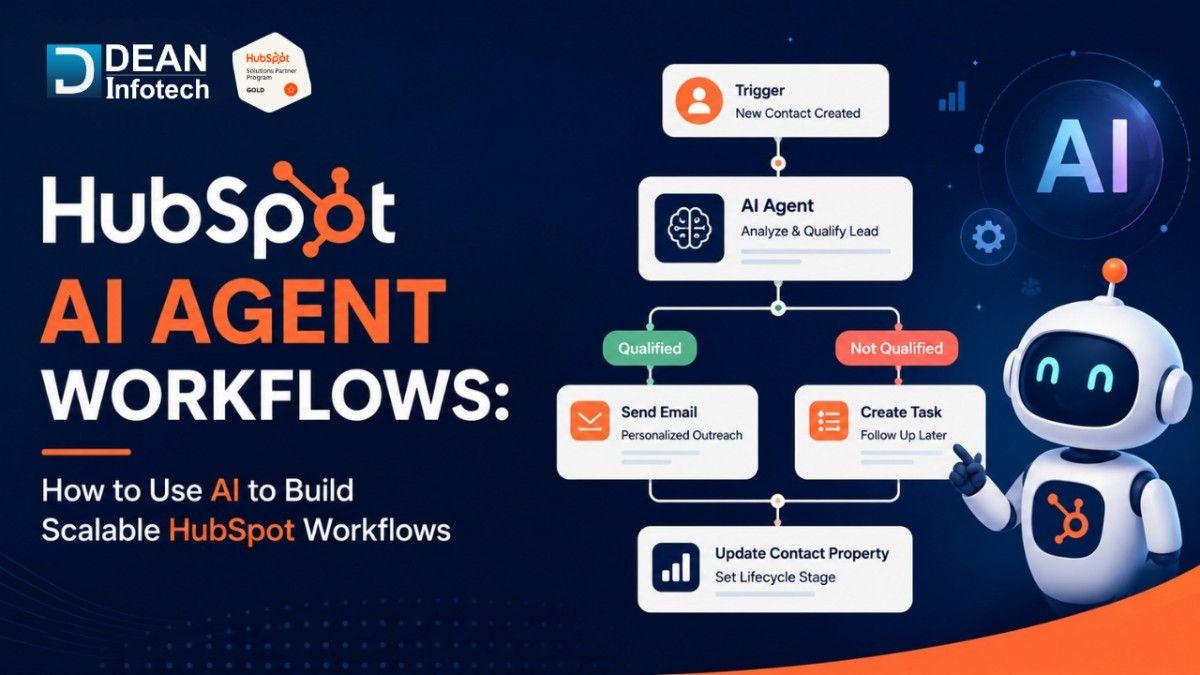
On top of that, they generate fantastic suggestions and fix issues, point out the best next steps, enhance customer data, and discover areas that require extra sales or support. Plus, they assist team members in making decisions using rock-solid data. In essence, companies get to put together incredibly intelligent operations.
Why Businesses Are Adopting AI-Powered Workflows
With the expansion of businesses, it begins to grow more difficult to manage the amount of data, customer interactions, and the number of operations. These are not readily available in traditional workflows and organizations, and organizations are looking for smarter and scalable solutions.
With the help of AI-driven workflows, companies can automate repetitive tasks, make better decisions and provide highly customized customer experiences. Automation and intelligence will support organizations to operate more efficiently, and support teams to focus on more value-added tasks.
Some of the various advantages include:
Semi-automated systems will be used to enhance productivity
Actively answer customers' enquiries and queries
Improved qualification and prioritization of leads
Enhanced customer experiences
Increased forecasting and reporting capabilities.
Greater operational scalability
Key Areas Where AI Improves HubSpot Workflows
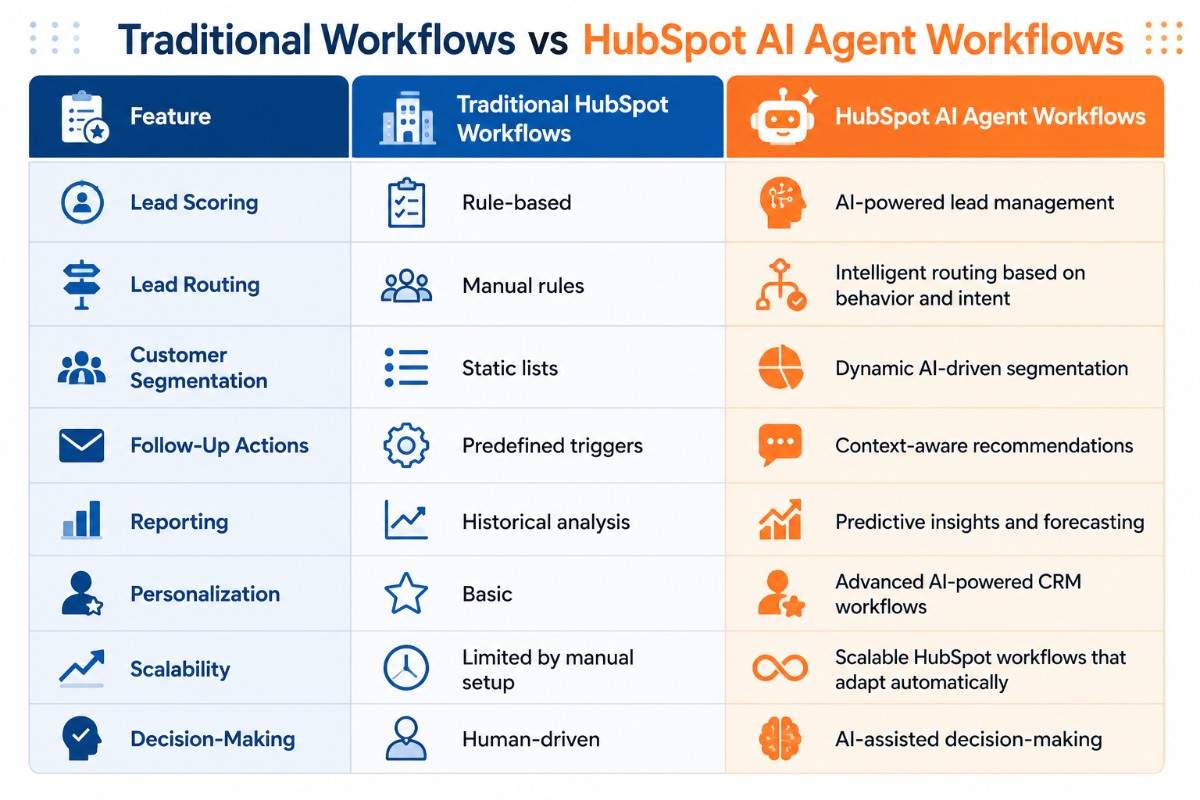
By leveraging HubSpot, companies can use AI to optimize their workflows, making them more intelligent, effective, and responsive. Some rules are defined beforehand and there are rules that are defined by AI and can analyse data in real-time, recognise patterns and make recommendations.
Companies can simplify, optimise and streamline complex workflows at scale, and make well-informed decisions and personalised customer service. These are a few of the strongest ways AI can be utilized in HubSpot workflows:
1. Intelligent Lead Scoring
Lead scoring is one of the most beneficial applications of AI.
AI can analyze:
Visits to the Website
Email engagement.
Submission
Content downloads
Historical conversion practices
This guides the sales teams to follow up with those leads more likely to convert.
2. Automated Lead Routing
Manual assignment of leads becomes less feasible as businesses expand.
AI-powered workflows can:
The route directs you to the correct sales representative.
Do you take a chance on a high-value pipeline?
Match leads on Geographical location and industry behavior.
Level off workload across teams
This consumes less response time and hence improves conversion opportunities.
3. Personalized Customer Engagement
Today's customers require individualized relationships. AI workflows can automatically tailor:
Email text
Follow-up sequences
Product recommendations
Landing page experiences
Customer journeys
Instead of designing generic experiences every time a person is exposed, organizations can serve many of them at scale.
Building Scalable AI Workflows in HubSpot
HubSpot allows easily building AI workflows, as outlined below:
Step 1: Define Your Business Objective
Before you begin any workflow, find out what result you desire.
Examples include:
Growing leads to conversions
Customer onboarding
Increasing sales cycles
Improvements in accuracy of reporting.
Step 2: Organize Your Data
AI is only as useful as the information that is inputted. Businesses should:
Eliminate duplicate records
Standardize contact properties
Review lifecycle stages
Regularly clean data in CRM
Having a solid data foundation should enhance day-to-day workflow and increase the efficiency and accuracy of reports.
Step 3: Identify Automation Opportunities
Time-consuming reviews. Common opportunities include:
Lead qualification
Reminder for follow-up
Meeting scheduling
Data entering
Customer onboarding
These areas tend to be the fastest areas to return.
Step 4: Combine AI with Workflow Automation
The optimal workflow integrations are a blend of decision-making artificial intelligence and standard automation.
Example:
A prospect fills out a whitepaper.
The workflow can:
Get the score by leveraging AI.
Analyze behavior.
Automatically chop contacts / automatically segment contacts.
Able to send personalized messages.
This is a much more intelligent workflow process than a simple rule-based workflow.
AI Workflow Use Cases for Different Teams
Marketing Teams
Marketing teams are now using HubSpot Marketing Automation AI for:
Segmenting your audience
Web optimization
Email nurturing
Campaign personalization
Content recommendations
These workflows not only help to boost the involvement but also minimize the manual work involved in the campaign.
Sales Teams
Sales organizations benefit through:
Predictive lead scoring
Opportunity prioritization
Automated follow-ups
Meetings preparation
Pipeline forecasting is the other hard-to-afford cost management approach. Only reliable cutting-edge data can provide the precise prediction of future costs.
Customer Success Teams
Customer success teams can automate:
Onboarding journeys using HubSpot onboarding automation
Renewal reminders.
Monitoring customers health
Upsell opportunity
Questions about satisfaction
This improves retention and customer lifetime value.
Common Mistakes to Avoid
Aside from potentially more efficient and productive workflows, there are some challenges to keep in mind: coordinating and planning these workflows are essential.
If not done properly, it can overly complicate, slow down, or otherwise devalue a company's processes, making them less rewarding in terms of value added from an investment in AI. Here are some of the typical pitfalls to avoid to achieve the best outcomes:
Over-Automating Everything
Not every process needs to be automated. Human oversight remains important for:
Strategic decisions
Complex negotiations
Operations involving customer data
Use AI to supplement teams
Ignoring Data Quality
Bad CRM data limits AI. Businesses should continuously maintain:
Precise contact history
Clean databases (free from things such as spyware)
Regular use of the field:
Building too many workflows
Multiple workflows will create standard confusion across dozens of workflows.
Build from the most, then add on.
Best Practices for Long-Term Success
To maximize results:
Begin with a single business objective
Monitor workflow performance from time to time.
Review AI recommendations frequently.
Consistency in workflows and customer journeys
Clean up and tune existing automation rules
Companies that adopt AI as an ongoing optimization effort are more likely than one-time projects to see the best results.
The Future of HubSpot AI Agent Workflows
AI is progressing at a rapid rate. Over time, all of the workflows will be more self-contained and have the potential to let your organization:
Predict customers' needs
Identify revenue opportunities
Automate complex decisions
Improve the accuracy of our predictions
Provide hyper-personalized experiences
As these capabilities evolve, AI agents will become more and more essential co-pilots to help with sales, marketing, customer success, and revenue operations.
Final Thoughts
HubSpot AI Agent Workflows are revolutionizing the way businesses can automate, engage with customers, and streamline workflows. Workflow automation and AI can work together to enhance other aspects of business, such as saving time and resources from repetitive tasks; improving decision-making; and giving a more personalised customer experience on a large scale.
From lead generation to customer onboarding, boosting sales efforts, or streamlining reporting, there are various ways AI-powered workflows can enhance your teams' efficiency and boost your business results.
Developing a successful AI workflow, though, demands the proper approach, settings, and continuous enhancements. Dean Infotech can assist with that! Dean Infotech is a reliable HubSpot Solutions Partner that helps businesses to design, implement and optimize AI workflows based on their business goals and workflows.
Looking to maximize the capabilities of HubSpot AI? Discuss with experts at Dean Infotech and create intelligent workflows to boost efficiency, scalability and growth.
Need expert help with your next project?
Get expert guidance across Salesforce, HubSpot, GoHighLevel (GHL), AI, and web development — tailored to your business.









Comments